Integration flow
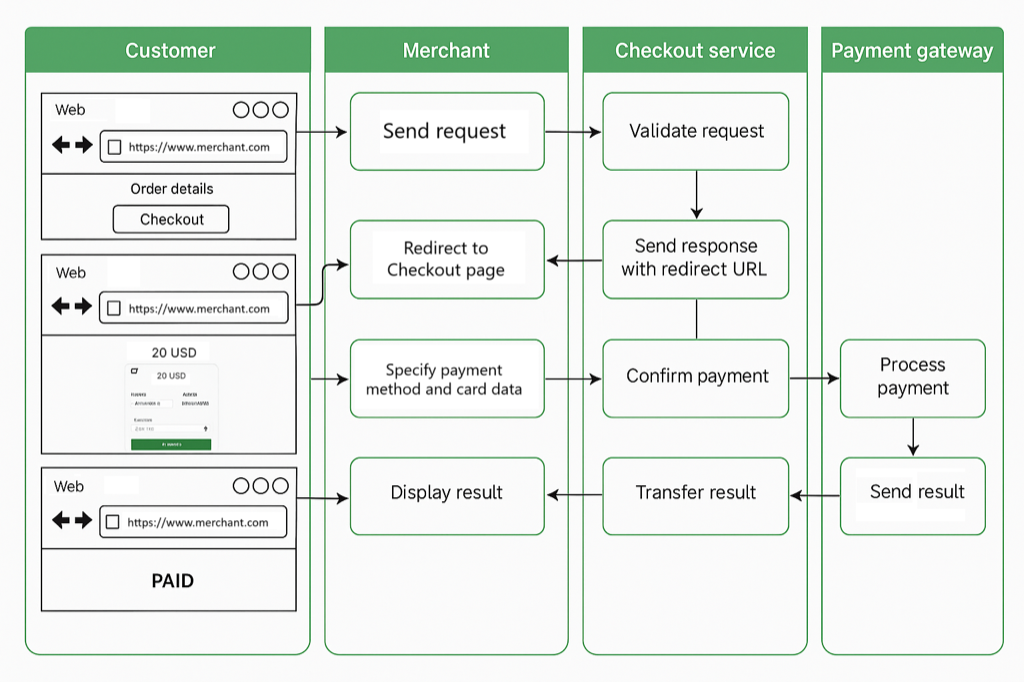
Diagram of the full payment flow with Checkout, from the moment the customer starts the purchase until they see the result:
Step by step
- The customer places an order and starts the payment on your site.
- Your site confirms the order and sends the payment request to Checkout (with the order details, payment details and
hash). - Checkout validates the request and responds with a redirect link.
- Your site redirects the customer to the Checkout page.
- The customer picks a payment method, enters their details and confirms.
- The payment is processed by the Payment Gateway.
- The Payment Gateway sends a callback to your site with the result.
- The result is shown to the customer.
The payment may be declined if invalid data is detected.
General requirements
- All requests must be sent as JSON, with the header:
Content-Type: application/json
- The CHECKOUT protocol must be mapped for the merchant before you can operate (merchants cannot take payments if the protocol is not mapped).
If the payment is made by a third party (the payer's details don't match the registered customer), the transaction is not processed automatically and requires manual review for Compliance reasons. It's recommended that the payment be made by the actual account holder to avoid delays.
If the amount paid doesn't match the amount owed (order.amount), the transaction is also not processed automatically and requires manual review.
If the transaction required manual review (third-party payment, or a different amount), the callback is still sent, but manually once the review is complete — not automatically.
Viewing transactions
Transactions can be viewed through the dashboard: https://dashboard.s-interio.com/
To get access, contact S-interio and provide the email address that should have access.